top of page

-
Open a new blank worksheet in Ms Excel.
-
Type the data below.
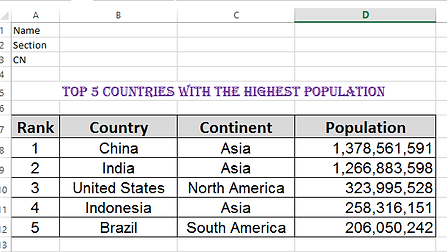
Data source: http://www.internetworldstats.com
3. Format the text and cells to make it visually appealing.
4. Name the worksheet as "Population".
5. Insert 2 more worksheets and name them as "Country" and "Continent".
6. Copy the data on Population worksheet and paste it on Country and Continent worksheets.
7. In the Country worksheet, sort the data by country in decreasing alphabetical order (Z to A).
8. In Continent worksheet, sort the data by continent in increasing alphabetical order (A to Z).
9. Save your work as Population Section CN.
Top 5 Countries with the Highest Population
bottom of page